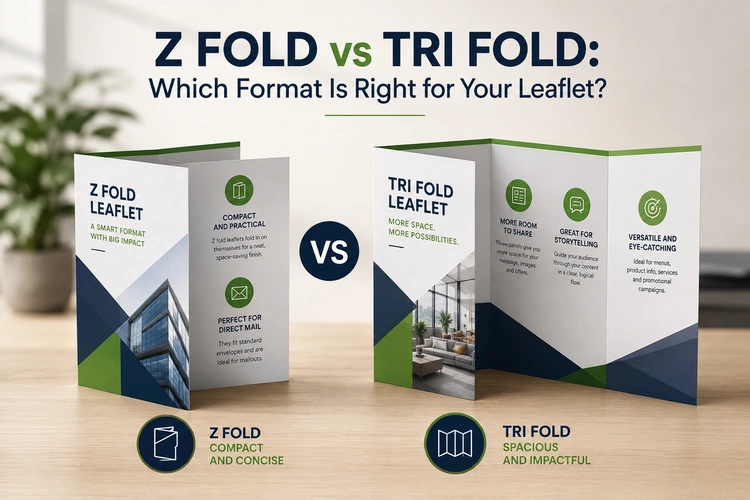
If you’re ordering z fold leaflets for the first time, there’s a good chance you’ve also come across tri fold — and found yourself wondering whether they’re essentially the same thing with a different name. They’re not. Both formats use a single sheet folded twice to create six panels, but the direction of those folds produces two genuinely different products that suit different content, different distribution methods, and different design approaches.
This guide explains how the two formats work, where they differ in practice, and how to decide which one fits your project.
The folding direction is what separates these formats — and it affects more than just aesthetics.
A z fold (sometimes called a concertina fold) alternates direction with each crease. Fold the sheet one way, then the other, and the result is a zig-zag structure that opens like an accordion. When a reader unfolds a z fold leaflet, each panel is revealed in sequence, one at a time, and the panels remain physically separate when the leaflet is fully open. There’s no tucking, no nesting — every panel is equally visible and equally weighted.
A tri fold (also known as a roll fold or c fold) works differently. Both folds go in the same direction, so the right-hand panel wraps around the middle, and then the left-hand panel folds over the top. The result is a nested structure: the front panel is a cover, the inside opens to reveal three connected panels, and the back panel acts as a reverse. Readers move through the leaflet in a layered way — cover first, then reveal, then full interior.
In practical terms, the z fold suits content that works as a series of independent sections — each panel carrying a complete thought or message. The tri fold suits content with a natural progression from introduction to detail, where the reveal structure reinforces the narrative flow.
This is the single most common source of artwork problems on folded leaflets, and it affects the two formats differently.
With a z fold, all three panels are equal in width. Because the folds alternate direction, no panel has to tuck inside another, so the sheet divides cleanly into three identical sections. Artwork can be set up in perfect thirds, and a design element crossing all six panels will align without adjustment.
With a tri fold, the panel that folds inward — the one that tucks under the front cover — must be narrower than the other two. If all three panels are the same width, the inner panel has nowhere to go: it protrudes past the edge, the leaflet won’t close flat, and the folded result buckles or bows. On 150 gsm stock, the inner panel typically needs to be around 2 mm narrower than the outer two. On heavier stocks — 250 gsm and above — that offset increases to 3–4 mm.
Many free tri fold templates available online ignore this entirely. They divide the sheet into equal thirds and produce an artwork file that looks correct on screen but creates a physical problem at the folding stage. A good printer’s template will handle this automatically; if you’re building your own layout from scratch, check the panel widths explicitly.
The practical implication: if your design has important elements — headlines, logos, product images — positioned at the edges of panels, the narrower inner panel on a tri fold can shift those elements closer to the fold line than intended. With a z fold, no such adjustment is needed.
The table below summarises how content type, audience, and distribution context map to each format.
| Content / context | Z fold | Tri fold |
|---|---|---|
| Sequential information (step-by-step, timelines, processes) | ✓ Strong | ✗ Less suited |
| Independent panel sections (services list, product showcase) | ✓ Strong | ✓ Works well |
| Layered narrative (intro → detail → call to action) | ✓ Works | ✓ Strong |
| Maps and visual guides | ✓ Strong | ✗ Less suited |
| Premium brand feel with reveal moment | ✗ Less suited | ✓ Strong |
| Direct mail (envelope insert) | ✓ Strong | ✓ Works well |
| Counter or display stand | ✓ Strong | ✓ Strong |
| Event programme or schedule | ✓ Strong | ✓ Works |
| Self-mailer (no envelope) | ✓ Strong | ✗ Less suited |
The z fold’s independent panels make it particularly effective for maps, event schedules, and any content where the reader needs to scan sections quickly rather than read through in order. Opening a z fold fully reveals all panels simultaneously — useful when the reader needs an at-a-glance overview.
The tri fold’s nested reveal is better suited to brand communications where the front panel needs to do the work of enticing the reader to open the leaflet. The cover functions as a proper cover: it holds the headline and a strong visual, and the reader has to engage actively to see what’s inside.
Both formats fold down to the same family of finished sizes, and both will fit inside a standard DL envelope (110 × 220 mm) when printed from an A4 flat sheet. However, there are practical differences worth knowing before you specify.
A z fold leaflet works well as a self-mailer — sent without an envelope, with the address panel printed on the back. Because the panels fold in opposite directions, the leaflet holds together securely without needing to be sealed. The zig-zag structure also means there are no tucked-in edges to catch on postal machinery. For more on size options and how they affect postage, see our guide to Z Fold Leaflet Sizes Explained.
A tri fold leaflet is less reliable as a self-mailer. The nested structure means the outer panel wraps around the others, but without being sealed, there’s a risk of the leaflet opening during transit. If you’re planning to post tri fold leaflets without envelopes, most operators use a wafer seal or a tab of adhesive to keep them closed — an additional step that adds cost and time.
For counter display or rack use, both formats sit well in a DL leaflet holder. The tri fold’s cover panel creates a cleaner front-facing display because the design is uninterrupted from top to bottom. A z fold leaflet, when standing in a holder, may show a fold line across the front panel depending on the stock weight and how the leaflet was handled in transit.
For most standard print runs, the two formats cost very similarly. But there are production details that occasionally matter when specifying.
Folding a z fold leaflet is mechanically straightforward. Because both folds run in opposite directions, the sheet feeds through a folding machine without any risk of the panels catching. The process is fast and reliable across a wide range of paper weights.
Tri fold production involves the same number of folds, but the nesting structure means the folding machine needs to manage the tuck-in accurately. On heavier stocks, a score line is typically applied before folding to prevent the outer fibres of the paper from cracking at the fold. Without scoring, folded leaflets on stocks of 170 gsm and above are prone to cracking along the crease — which looks unprofessional and weakens the fold over time.
This scoring requirement applies to both formats on heavier stocks, but the risk is slightly higher on tri fold because the inner panel is under more physical stress when nested. For a full breakdown of which paper weights require scoring and how to choose the right stock for your project, see our guide to Choosing Paper Weight and Finish for Z Fold Leaflets.
If you’re still undecided, run your project through these questions:
Does your content work as equal, independent sections? If yes — a z fold. If your content has a strong front cover and a reveal structure — a tri fold.
Are you posting without an envelope? Z fold is the more reliable choice for self-mailers.
Does your design span multiple panels as a panoramic spread? Z fold, because the panels align and open flat simultaneously.
Do you need a prominent front cover with a headline and hero image? Tri fold gives you a clean, uninterrupted cover panel.
Is artwork setup experience limited? Z fold is simpler to set up — equal panel widths, no nesting compensation.
Are you distributing in counter holders or display racks? Both work; tri fold has a marginally cleaner face-on presentation.
Once you’ve confirmed the format is right for your project, the next decision is what it will be used for — which shapes the size, paper weight, and quantity you should order. Our guide to What to Use Z Fold Leaflets For covers seven industry contexts in detail, with specific guidance on how each type of project maps to a format and spec.
If you’ve landed on z fold as the right format, you can browse sizes, paper stocks, and turnaround options directly on our z fold leaflet printing page and configure your order online. If you’re not yet sure on spec, our team is available to advise — contact us or call 023 8087 8037.

